NL: Deze documentatie is alleen in het Engels beschikbaar.
EN: Please note: this documentation is only available in English.
Ons API primarily exposes data through Ons API models. In some cases, data that is available in OnsDB is not yet available through these models. For these situations, individual OnsDB tables can be added to an Ons API connector. This makes it possible to retrieve OnsDB table data through the existing Ons API connector, without having to run the separate OnsDB application for this purpose.
When to use OnsDB tables
We recommend using Ons API models whenever the required data is available through a model. Ons API models support the regular Ons API configuration options, including field selection and data minimization.
Use OnsDB tables only when the required data is not available through Ons API models.
Configuring OnsDB tables
OnsDB tables can be added to a connector version in the Ons API Dashboard.The configuration is similar to configuring Ons API models:
- Open the connector version in the Ons API Dashboard.
- Go to the tab for OnsDB tables.
- Select the OnsDB tables required for the integration.
- Save the configuration.
- Continue the regular review and promotion process for the connector version.
The selected OnsDB tables are part of the connector specification, similar to selected Ons API models.
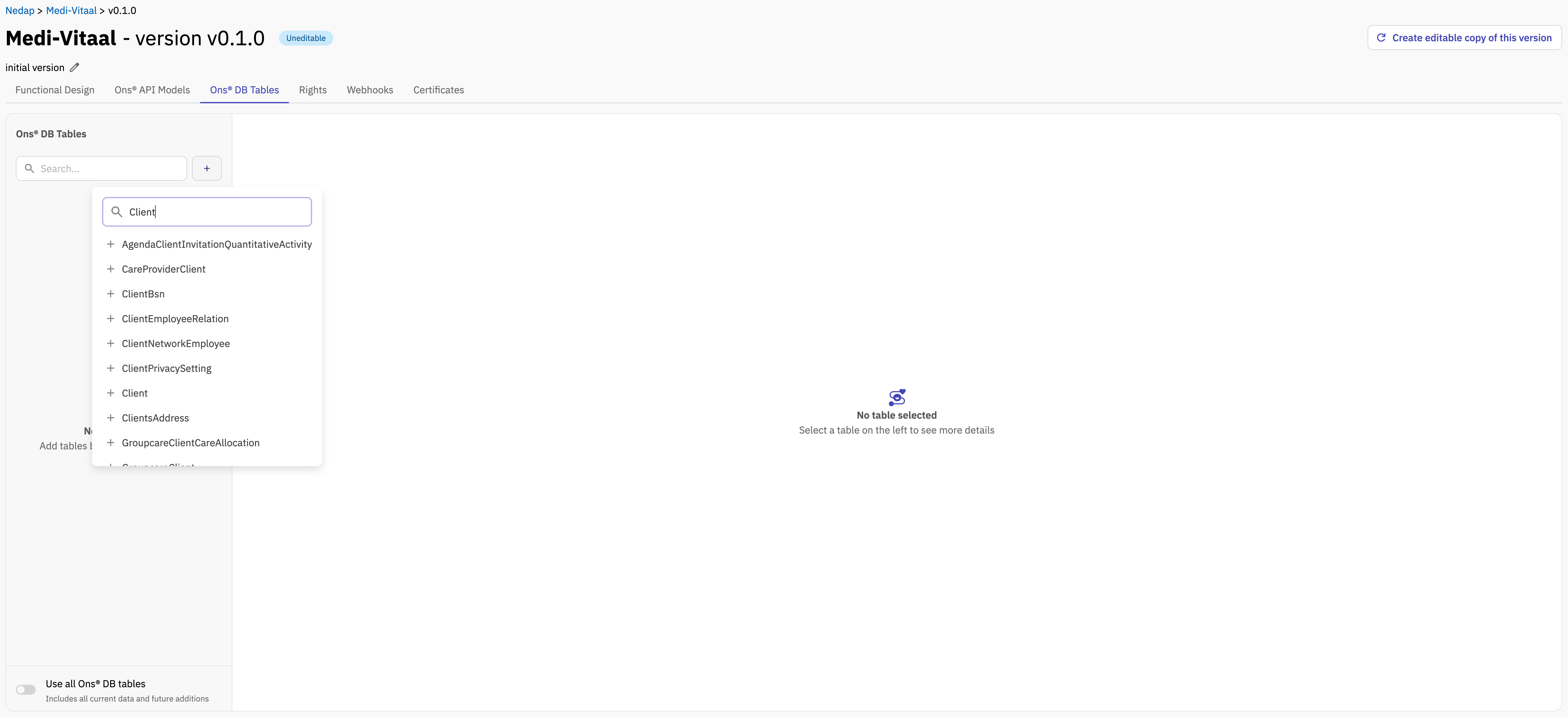
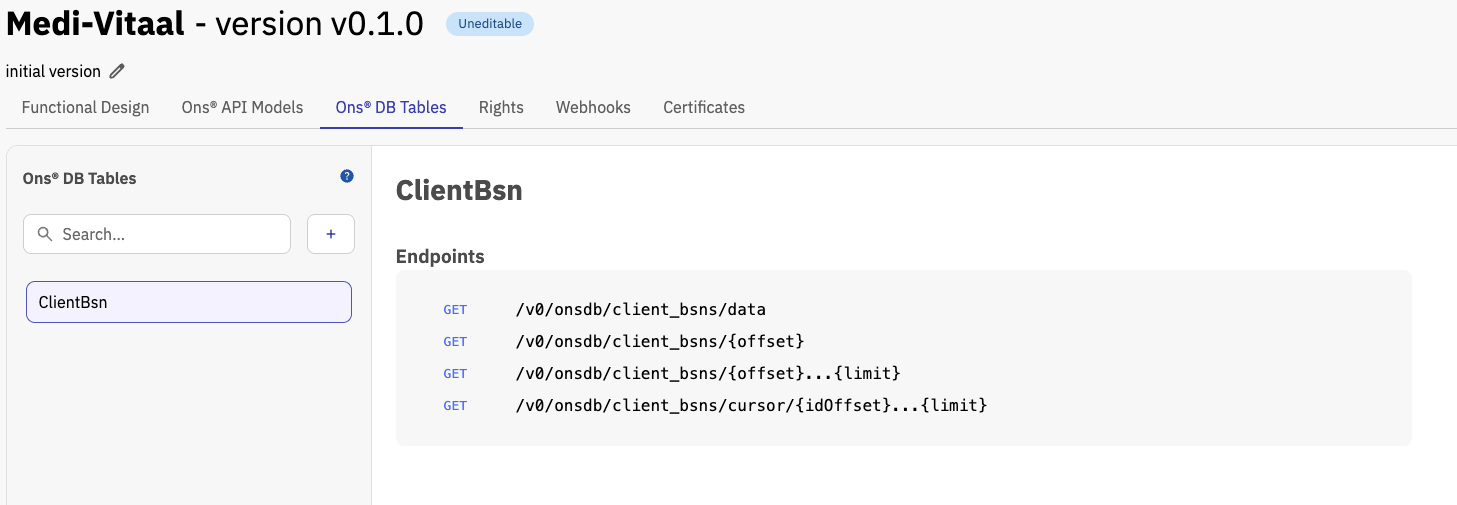
To find out which API endpoint you need to call, select the relevant Ons® DB Table from the menu on the left. Once selected, all available endpoints for that table will be displayed on the right.
Retrieving OnsDB table data
Retrieving data from an OnsDB table works differently from retrieving data from Ons API models.
When retrieving an OnsDB table, the request must specify the OnsDB schema version that should be used. This is done with the `X-Stream-SchemaVersion` header.
For example:
http
GET {onsdb-table-endpoint} HTTP/2
Host: api-development.ons.io
Accept: application/json
X-Stream-SchemaVersion: 4223
The schema version must refer to an available OnsDB data model. See the article Datamodellen in OnsDB for the currently supported OnsDB data models.
Endpoints
The data endpoints retrieve records from OnsDB tables. When selecting an OnsDB table in the Ons®API Dashboard it should show the endpoints available on the right.
Responses can be requested as JSON (application/json) or NDJSON (application/x-ndjson) using the Accept header.
Retrieve all records
GET /v0/onsdb/{table}/data
Returns all available records for the specified resource.
For large datasets, one of the pagination endpoints is recommended to avoid retrieving the complete dataset in a single request.
For example:
GET /stream/clients/dataAccept: application/json
Retrieve records using an offset and limit
GET /v0/onsdb/{table}/{offset}...{limit}
Returns a page of records using offset-based pagination.
- Offset: Zero-based number of records to skip.
- Limit: Maximum number of records to return.
For example, an offset of 100 and a limit of 50 retrieves at most 50 records after skipping the first 100 records.
For example:
GET /stream/clients/100...50Accept: application/json
Retrieve all records after an offset
GET /v0/onsdb/{table}/{offset}
Returns all records after skipping the specified number of records.
The offset is zero-based. Unlike the offset-and-limit endpoint, this endpoint does not impose a maximum number of returned records.
For example:
GET /stream/clients/100Accept: application/json
Retrieve records for a specific date
GET /v0/onsdb/{table}/{date}
Returns records whose resource-specific date field falls on the requested calendar date.
The date must use the YYYY-MM-DD format.
For example:
GET /stream/audit_trails/2026-07-27Accept: application/json
Retrieve records within a period
GET /v0/onsdb/{table}/{year}-{month}-{day}...{to-year}-{to-month}-{to-day}
Returns records whose resource-specific date field falls within the requested date range.
Both dates are inclusive and must use the YYYY-MM-DD format.
For example:
GET /stream/audit_trails/2026-07-01...2026-07-31Accept: application/json
Retrieve records using cursor pagination
GET /v0/onsdb/{table}/cursor/{idOffset}...{limit}
Returns the next page of records using the resource’s primary key as a cursor.
- idOffset: Primary-key value after which records should be returned.
- limit: Maximum number of records to return.
Only records with a primary-key value greater than idOffset are returned, ordered by primary key. To request the next page, use the primary-key value of the last record from the current response as the next idOffset.
For example:
GET /stream/clients/cursor/1500...100Accept: application/json
Schema versions
OnsDB table structures can change between schema versions. By explicitly specifying the schema version, the response is based on the table structure for that specific OnsDB data model.
Use a supported schema version and update the integration when the configured schema version is no longer supported.
For more information about supported OnsDB data models, see: Datamodellen in OnsDB.
Field filtering
Field filtering is not supported for OnsDB table responses.
This means that the fields in the response cannot be limited by selecting individual fields in the connector configuration or by using the following header:
X-Field-Whitelist
Because of this, OnsDB tables can return more data than strictly required for the integration. From a data minimization perspective, we recommend to use Ons API models whenever the required data is available through those models.